On this page
- What PP-StructureV3 does
- Install
- Quick start: Python and CLI
- Real output: an invoice and a paper page
- Fix: use the PP-OCRv6 text models
- Multi-page PDF to one Markdown file
- Tables
- Formulas
- Seals and charts
- Parameters that matter
- What's in a result
- Saving: Markdown, JSON, Word, HTML, Excel
- Performance on CPU
- Coming from PaddleOCR 2.x PPStructure
- When not to use PP-StructureV3
- FAQ
Short answer: pip install "paddleocr[doc-parser]", then PPStructureV3().predict("file.pdf") and call save_to_markdown() on each page. Tables come out as HTML, formulas as LaTeX. On our 4-core CPU a page took about 13–15 seconds. One tip worth knowing: the 3.7 pipeline still reads text with PP-OCRv5 models — passing the PP-OCRv6 models fixed every text error on our invoice and was faster.
What PP-StructureV3 does#
PP-StructureV3 arrived with PaddleOCR 3.0 in May 2025 and builds on the earlier layout-parsing pipeline. It adds better layout, table and formula models, chart understanding, multi-column reading order and Markdown output.15 It's a chain of about a dozen small models, each switched on or off by a use_* flag:
These are the defaults PaddleOCR 3.7.0 actually loads. They live in the PaddleX 3.7.2 pipeline config, not in PaddleOCR's own docs, which is why some of them surprise people:3
| Job | Default model | On by default? | Switch |
|---|---|---|---|
| Layout detection | PP-DocLayout_plus-L | Always | — |
| Region (column) detection | PP-DocBlockLayout | Yes | use_region_detection |
| Text detection / recognition | PP-OCRv5_server_det / PP-OCRv5_server_rec | Always | — |
| Tables | PP-LCNet_x1_0_table_cls picks wired vs wireless; SLANeXt_wired / SLANet_plus structure; RT-DETR-L cell detectors | Yes | use_table_recognition |
| Formulas | PP-FormulaNet_plus-L | Yes | use_formula_recognition |
| Seals (stamps) | PP-OCRv4_server_seal_det | No | use_seal_recognition |
| Charts → tables | PP-Chart2Table (0.58B parameters) | No | use_chart_recognition |
| Page orientation / unwarping | PP-LCNet_x1_0_doc_ori / UVDoc | No | use_doc_orientation_classify, use_doc_unwarping |
| Text-line orientation | PP-LCNet_x1_0_textline_ori | No | use_textline_orientation |
Two things to note. The usage doc lists SLANeXt_wireless for borderless tables, but the config loads SLANet_plus.13 And PP-StructureV3 does not use PP-DocLayoutV2/V3 — those belong to PaddleOCR-VL. The trade-off between the two: PP-StructureV3 gives you cell-level and text-line coordinates, which the VL series doesn't.5
Install#
PP-StructureV3 needs the doc-parser extra on top of PaddleOCR and an inference engine. These are the commands we used:4
python -m pip install paddlepaddle==3.2.0
python -m pip install "paddleocr[doc-parser]==3.7.0" python-docx
python -m pip install paddlepaddle-gpu==3.2.0 -i https://www.paddlepaddle.org.cn/packages/stable/cu126/
python -m pip install "paddleocr[doc-parser]==3.7.0" python-docxThe extra pulls in paddlex[ocr,genai-client] — BeautifulSoup, lxml, openpyxl, pypdfium2, scikit-learn, tokenizers and more. Python 3.9 or newer is required for it. We add python-docx because the extra doesn't include it, and without it Word export — and the CLI's --save_path — fails (details). We pin paddlepaddle==3.2.0 because the current PyPI release, 3.3.1, crashed PaddleOCR 3.7.0 on CPU in our tests (details and fixes).
Without the extra, creating the pipeline fails. This is the error we reproduced:
RuntimeError: A dependency error occurred during pipeline creation. Please refer to the installation documentation to ensure all required dependencies are installed.
(caused by DependencyError: `PP-StructureV3` requires additional dependencies. To install them, run `pip install "paddlex[ocr]==<PADDLEX_VERSION>"` if you're installing `paddlex` from an index, ...)
The fix is pip install "paddleocr[doc-parser]" — the message suggests installing paddlex[ocr] directly, which works too but is easy to get out of step with PaddleOCR's pin.
Quick start: Python and CLI#
from paddleocr import PPStructureV3

pipeline = PPStructureV3(
    use_doc_orientation_classify=False,   # already the default; set True for rotated scans
    use_doc_unwarping=False,              # set True for photographed, curved pages
)
for res in pipeline.predict("invoice.png"):
    res.print()                                  # structured result in the terminal
    res.save_to_markdown(save_path="output")     # output/invoice.md + output/imgs/
    res.save_to_json(save_path="output")         # output/invoice_res.json
    res.save_to_img(save_path="output")          # layout, OCR and reading-order overlays
paddleocr pp_structurev3 -i invoice.png --save_path ./output
# GPU, and the switches you'll use most
paddleocr pp_structurev3 -i scan.pdf --device gpu:0 \
--use_doc_orientation_classify True --use_chart_recognition True --save_path ./outputThe first run downloads every default model to ~/.paddlex/official_models/. In the CLI, --save_path calls every registered save method for each page, Word export included — so without python-docx our CLI run wrote the Markdown, JSON, HTML, XLSX and images, then stopped with ModuleNotFoundError: No module named 'docx' and exit code 1.94 The device is chosen automatically (GPU 0 if available); pass device="cpu" or device="gpu:0" to force it.
Real output: an invoice and a paper page#
Here is exactly what the default pipeline produced on our two test pages — nothing edited. Left: the image we fed it. Right: the .md file from save_to_markdown().4
Invoice#
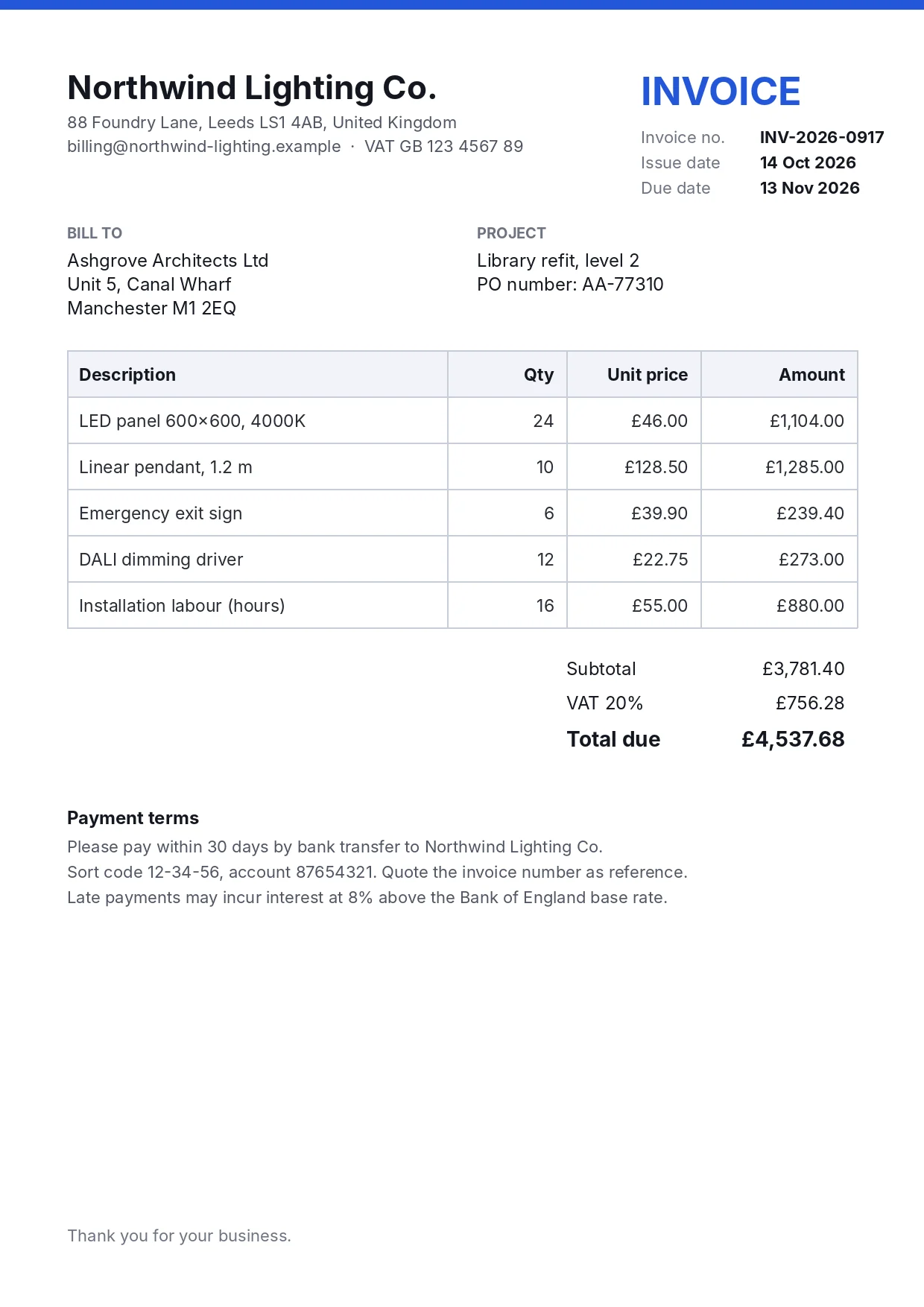
## Northwind Lighting Co

88 Foundry Lane, Leeds LS1 4AB, United Kingdom billing@northwind-lighting.example·VAT GB 123 4567 89INVOICE

Invoice no.INV-2026-0917Issue date 14 Oct 2026Due date 13 Noy 2026

BILL TO

Ashgrove Architects Ltd Unit 5. CanaL Wharf Manchester M1 2EQ

PROJECT

Library refit, Ievel 2PO number: AA-77310


<div style="text-align: center;"><html><body><table border="1"><tbody><tr><td>Description</td><td>Qty</td><td>Unit price</td><td>Amount</td></tr><tr><td>LED panel 600×600,4000K</td><td>24</td><td>£46.00</td><td>£1,104.00</td></tr><tr><td>Linear pendant, 1.2 m</td><td>10</td><td>£128.50</td><td>£1,285.00</td></tr><tr><td>Emergency exit sign</td><td>6</td><td>£39.90</td><td>£239.40</td></tr><tr><td>DALI dimming driver</td><td>12</td><td>£22.75</td><td>£273.00</td></tr><tr><td>Installation labour (hours)</td><td>16</td><td>£55.00</td><td>£880.00</td></tr></tbody></table></body></html></div>


## Payment terms

Subtotal £3,781.40VAT 20%£756.28Total due £4,537.68Please pay within 30 days by bank transfer to Northwind Lighting Co.Sort code 12-34-56, account 87654321. Quote the invoice number as reference.Late payments may incur interest at 8% above the Bank of England base rate.
The table HTML above, rendered as-is:
| Description | Qty | Unit price | Amount |
| LED panel 600×600,4000K | 24 | £46.00 | £1,104.00 |
| Linear pendant, 1.2 m | 10 | £128.50 | £1,285.00 |
| Emergency exit sign | 6 | £39.90 | £239.40 |
| DALI dimming driver | 12 | £22.75 | £273.00 |
| Installation labour (hours) | 16 | £55.00 | £880.00 |
What it got right: all 24 table cells, every number and price, the two section headings and every line of the payment terms. What went wrong:
- Three lines have wrong characters:
Noyfor Nov,Ievel(capital I) for level, andUnit 5. CanaLfor Unit 5, Canal. These come from the PP-OCRv5 text recogniser — see the fix. - Line breaks inside a block vanish without a space. "INV-2026-0917Issue date 14 Oct 2026Due date" was three label/value rows on the page. If you need key–value pairs, read
overall_ocr_res(one entry per text line) instead of the Markdown. - Reading order slipped once. The totals block was placed after the "Payment terms" heading and glued to the paragraph below it.
- The footer is gone. "Thank you for your business." was detected — it's in the JSON with label
footer— butfooteris in the defaultmarkdown_ignore_labels, along with header, number, footnote, aside_text and the header/footer images.3 Passmarkdown_ignore_labels=[]to keep everything. - The table has no
<thead>; the header row is an ordinary row. The heading lost its trailing full stop ("Northwind Lighting Co").
Paper page with a formula and a table#
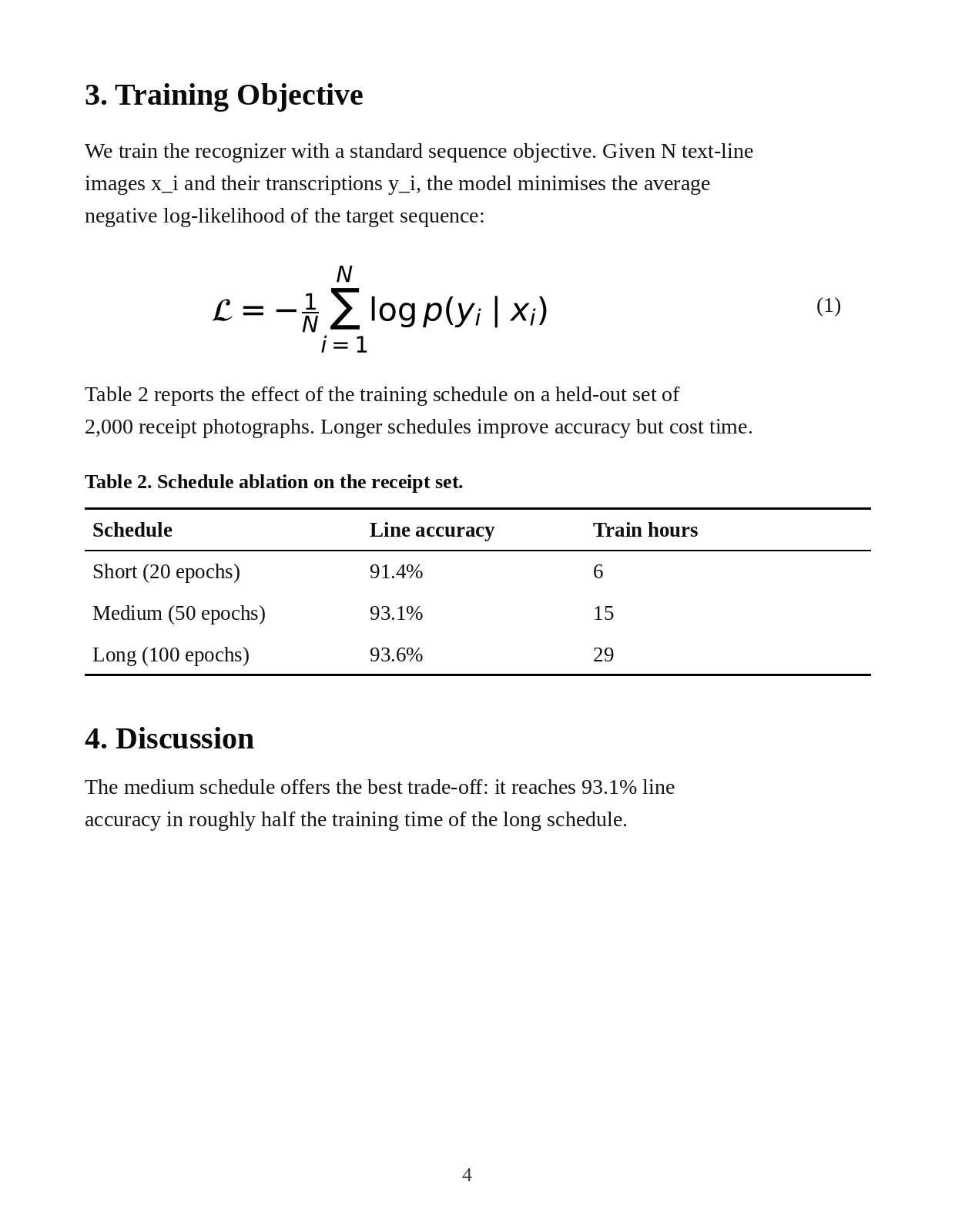
### 3. Training Objective

We train the recognizer with a standard sequence objective. Given N text-line images x_i and their transcriptions y_i, the model minimises the average negative log-likelihood of the target sequence:

$$\mathcal{L}=-\textstyle\frac{1}{N}{\sum_{i\:=\:1}^{N}}\mathsf{l o g}\:p(y_{i}\mid x_{i}),$$

Table 2 reports the effect of the training schedule on a held-out set of 2,000 receipt photographs. Longer schedules improve accuracy but cost time.

<div style="text-align: center;">Table 2. Schedule ablation on the receipt set.</div>


<div style="text-align: center;"><html><body><table border="1"><thead><tr><td>Schedule</td><td>Line accuracy</td><td>Train hours</td></tr></thead><tbody><tr><td>Short (20 epochs)</td><td>91.4%</td><td>6</td></tr><tr><td>Medium (50 epochs)</td><td>93.1%</td><td>15</td></tr><tr><td>Long (100 epochs)</td><td>93.6%</td><td>29</td></tr></tbody></table></body></html></div>


### 4. Discussion

The medium schedule offers the best trade-off : it reaches 93.1% line accuracy in roughly half the training time of the long schedule.
This page came out almost perfect. Every word of body text is right; the table is exact and this time has a proper <thead>; the caption is kept as its own block. The formula is mathematically correct LaTeX, with two quirks: "log" is emitted as \mathsf{l o g} (renders as sans-serif "log" rather than the usual \log), and the equation number "(1)" was detected as formula_number but doesn't appear in the Markdown. The page number "4" is dropped on purpose (label number). Numbered headings became ###; the invoice's unnumbered headings became ##.
Fix: use the PP-OCRv6 text models#
PaddleOCR 3.7.0 made PP-OCRv6 the default for plain OCR, but PP-StructureV3's config still loads PP-OCRv5_server_det and PP-OCRv5_server_rec.3 You can't switch with ocr_version="PP-OCRv6" — the class only accepts PP-OCRv3, v4 and v5 there.2 Pass the model names instead:
from paddleocr import PPStructureV3

pipeline = PPStructureV3(
    text_detection_model_name="PP-OCRv6_medium_det",
    text_recognition_model_name="PP-OCRv6_medium_rec",
)
We ran the invoice through both configurations on the same machine. Every line that differs:4
| Default (PP-OCRv5_server) | With PP-OCRv6_medium | On the page |
|---|---|---|
Due date 13 Noy 2026 | Due date 13 Nov 2026 | 13 Nov 2026 |
Library refit, Ievel 2 | Library refit, level 2 | Library refit, level 2 |
Unit 5. CanaL Wharf | Unit 5, Canal Wharf | Unit 5, Canal Wharf |
LED panel 600×600,4000K | LED panel 600×600, 4000K | LED panel 600×600, 4000K |
billing@…example·VAT GB | billing@…example· VAT GB | billing@…example · VAT GB |
All four wrong characters were fixed and two missing spaces restored; nothing got worse. The errors really are the text model's: in our plain-OCR benchmark, PP-OCRv5_server on its own made exactly the same Noy, CanaL and Ievel mistakes on this invoice. The rest of the Markdown — table, headings, reading order — was identical, because only the text models changed.
Swapping in PP-OCRv6 text models also fixed every text error. PP-StructureV3, invoice page, warm run, 4-vCPU Xeon, PaddlePaddle 3.2.0 on CPU. Lower is faster.
| Text models | Seconds |
|---|---|
| Default (PP-OCRv5_server) | 14.9 s |
| PP-OCRv6_medium det + rec | 13.4 s |
_src/data/bench/structure_v6.py.That speed-up matches our plain-OCR benchmark, where PP-OCRv6_medium was both faster and more accurate than PP-OCRv5_server on CPU. A bonus: PP-OCRv6 medium reads 50 languages with one model, including Japanese and 46 Latin-script languages, so it also covers mixed-language documents the default handles less well.8
Other languages#
The lang parameter picks text models for you, but only from PP-OCRv5 and older. In the 3.7.0 source, lang="en", "ch", "chinese_cht" and "japan" all map to PP-OCRv5_server_rec; Latin languages such as "fr" or "de" get latin_PP-OCRv5_mobile_rec; Korean, Thai, Greek and East Slavic get their own PP-OCRv5 mobile models; Arabic, Cyrillic and Devanagari scripts fall back to PP-OCRv3 models.2 If you pass model names, lang is ignored with a warning. See the language list for every code.
Multi-page PDF to one Markdown file#
predict() on a PDF returns one result per page, and save_to_markdown() writes one file per page. To get a single file, collect each page's res.markdown and join them with concatenate_markdown_pages(), which also decides whether a paragraph continues across the page break:12
from pathlib import Path
from paddleocr import PPStructureV3

pipeline = PPStructureV3()
pages = pipeline.predict("report.pdf")

markdown_list, images = [], []
for res in pages:
    markdown_list.append(res.markdown)
    images.append(res.markdown.get("markdown_images", {}))

merged = pipeline.concatenate_markdown_pages(markdown_list)
text = merged["markdown_texts"]          # merged is a MarkdownResult, not a str

out = Path("output"); out.mkdir(exist_ok=True)
(out / "report.md").write_text(text, encoding="utf-8")
for page_images in images:                       # figures and table crops
    for rel_path, img in page_images.items():
        (out / rel_path).parent.mkdir(parents=True, exist_ok=True)
        img.save(out / rel_path)
The official PDF example crashes. The usage doc writes the return value of concatenate_markdown_pages() straight to a file with f.write(markdown_texts).1 In PaddleOCR 3.7.0 with PaddleX 3.7.2 that function returns a MarkdownResult object, and we got TypeError: write() argument must be str, not MarkdownResult (plus an empty output file). Index it with ["markdown_texts"], as in the script above.34
What happened on our 2-page PDF#
We wrapped the same two test images into a PDF with Pillow (which stores them as JPEG) and ran it through the pipeline. PaddleX renders PDF pages at zoom 2.0, so the invoice came back as a 1191 × 1684 px image instead of the original 1240 × 1754.34 That small change had visible effects:
- Default models lost most spaces between words: "88FoundryLane,LeedsLS14AB,UnitedKingdom", "Please pay within30days". The character errors from the PNG run disappeared, though.
- With PP-OCRv6 the text was clean — "88 Foundry Lane, Leeds LS1 4AB, United Kingdom" — except for one run of digits ("VAT GB 123456789").
- In both configurations the totals block vanished. "Subtotal", "VAT 20%" and "Total due" were recognised by OCR — they're in
overall_ocr_res— but no layout box covered them, so they never reachedparsing_res_listor the Markdown. In the PNG run that block's layout score was only 0.40. - The formula on page 2 came out cleaner than from the PNG:
\log p(y_{i}\mid x_{i})instead of\mathsf{l o g}.
The fix for the missing block was layout_threshold. Re-running the PDF with predict(..., layout_threshold=0.3) brought the totals back into the Markdown ("Subtotal £3,781.40VAT 20%£756.28Total due £4,537.68"). The labels shifted, though: at 0.3 one of the two top headings was no longer tagged as a title and an extra header block appeared; at 0.2 neither top heading was a title. Lower the threshold only as far as you need.4
The general lesson: layout detection decides what reaches your Markdown, and it is sensitive to resolution and compression. Spot-check a few pages of every new document type against overall_ocr_res, which keeps every line the OCR found.
Tables#
Table recognition is on by default. A classifier decides whether each table is wired (ruled) or wireless, then structure and cell models rebuild it as HTML. Every table on the page lands in table_res_list, and the same HTML is embedded in the Markdown.1
for res in pipeline.predict("invoice.png"):
    for i, table in enumerate(res["table_res_list"]):
        html = table["pred_html"]          # "<html><body><table>..."
        cells = table["cell_box_list"]     # one box per cell, page coordinates
        print(i, len(cells), html[:80])
    res.save_to_html(save_path="output")   # one .html file per table
    res.save_to_xlsx(save_path="output")   # one .xlsx file per table
On our invoice cell_box_list held 24 boxes, one per cell, and on the paper page 12. Each entry also has table_ocr_pred with the raw OCR inside the table.4 The predict() options that change table behaviour are:2
| Parameter | Default | Use it when |
|---|---|---|
use_table_orientation_classify | True | Tables can be rotated 90°/180°/270° on the page. |
use_ocr_results_with_table_cells | True | Splits OCR results along predicted cell boundaries and re-recognises them, so text isn't lost across cells. |
use_e2e_wired_table_rec_model | False | Ruled tables: use the structure model alone, without the cell detector. |
use_e2e_wireless_table_rec_model | True | Borderless tables already use the structure model alone by default. |
use_wired_table_cells_trans_to_html | False | Build the HTML directly from detected cell boxes of ruled tables (good for clean grids). |
use_wireless_table_cells_trans_to_html | False | Same for borderless tables. |
If you only need tables and no layout, the separate table_recognition_v2 pipeline (TableRecognitionPipelineV2) is lighter.
Formulas#
Formula recognition is on by default and uses PP-FormulaNet_plus-L. Each formula appears in formula_res_list with rec_formula (LaTeX), and in the Markdown as a $$…$$ block — our paper page above is a real example.14 The L model is the most accurate and by far the heaviest piece of the pipeline. Baidu's own numbers (Tesla T4 GPU / Xeon Gold 6271C CPU):1
| Model | En-BLEU | Zh-BLEU | CPU ms (HP mode) | Size |
|---|---|---|---|---|
PP-FormulaNet_plus-L (default) | 92.22 | 90.64 | 3125.58 | 698 MB |
PP-FormulaNet_plus-M | 91.45 | 89.76 | 1615.80 | 592 MB |
PP-FormulaNet_plus-S | 88.71 | 53.32 | 260.99 | 248 MB |
For English-only documents on CPU, formula_recognition_model_name="PP-FormulaNet_plus-S" is roughly 12× faster per formula by those numbers, at a small English accuracy cost (and a large Chinese one). If your documents have no maths, use_formula_recognition=False skips the model entirely. That flag is also required with engine="onnxruntime", because the formula model isn't supported there yet.1
Seals and charts#
Both are off by default. use_seal_recognition=True adds PP-OCRv4_server_seal_det to read curved text on stamps — common on Chinese invoices and contracts — with its own seal_det_* thresholds; results go to seal_res_list.1 use_chart_recognition=True converts bar, line and pie charts into tables with PP-Chart2Table, a 0.58B-parameter model of about 1.4 GB.1 Baidu's quality figures for it are inconsistent: the usage doc reports a "Model Score" of 75.98, the 3.1.0 release notes an RMS-F1 of 80.60% — probably different metrics. Neither was part of our test; expect charts to be slow on CPU given the model size.
Parameters that matter#
Every constructor parameter defaults to None, meaning "use the PaddleX config". The usage doc publishes the values those resolve to — but for some settings, the config PaddleOCR 3.7.0 actually loads says otherwise:13
| Parameter | Docs say | PaddleX 3.7.2 config | What it does |
|---|---|---|---|
text_det_limit_side_len | 960 | 736 | Target size for the text-detection input. |
text_det_limit_type | max | min | Whether the limit applies to the long or short side. |
text_det_unclip_ratio | 2.0 | 1.5 | How much each text box is expanded. |
layout_threshold | 0.5 | Per class, 0.3–0.5 | Layout confidence cut-off; accepts a float or {class_id: value}. |
text_det_thresh / text_det_box_thresh | 0.3 / 0.6 | 0.3 / 0.6 | Pixel and box score thresholds for text. |
layout_nms / layout_merge_bboxes_mode | True / large | — | Overlap handling for layout boxes. |
use_region_detection | True | True | Column/region grouping for reading order. |
format_block_content | False | False | Format each block_content as Markdown in the JSON. |
markdown_ignore_labels | number, footnote, header, header_image, footer, footer_image, aside_text | Blocks left out of the Markdown. | |
The config wins. Our saved JSON records the settings actually used: overall_ocr_res.text_det_params reads limit_side_len 736, limit_type "min", unclip_ratio 1.5, max_side_limit 4000 — the config values, not the documented ones.4 If you tuned PP-StructureV3 by the docs and saw no change, this is why.
Engine options go in as keyword arguments too: device, engine, enable_mkldnn (default True), cpu_threads (default 10), enable_hpi, use_tensorrt, precision and paddlex_config for a full YAML override.1
What's in a result#
Each page result is a dict-like object. The JSON file has the same fields:14
| Field | Contents |
|---|---|
parsing_res_list | The blocks in reading order: block_label (text, paragraph_title, table, formula, figure_title, footer…), block_content, block_bbox, block_id, block_order. Ignored labels have block_order: null. |
layout_det_res | Raw layout boxes with label and score. |
overall_ocr_res | Every text line: rec_texts, rec_scores, rec_polys, rec_boxes, plus text_det_params. Our invoice had 52 lines. |
table_res_list | pred_html, cell_box_list, table_ocr_pred per table. |
formula_res_list | rec_formula (LaTeX), rec_polys, formula_region_id. |
seal_res_list | Seal text, when enabled. |
model_settings, width, height, page_index, page_count | Run settings and page info (page_index is None for images). |
res.markdown is a dict with markdown_texts, markdown_images, page_continuation_flags, page_index and input_path; res.img gives the visualisations (layout_det_res, overall_ocr_res and others).1
Saving: Markdown, JSON, Word, HTML, Excel#
We called every save method on our results. Six worked out of the box; one needed an extra package:4
| Method | Writes | Our result |
|---|---|---|
save_to_markdown(path) | {name}.md plus an imgs/ folder with table, formula and figure crops | Worked |
save_to_json(path) | {name}_res.json with every field above | Worked |
save_to_img(path) | Layout, OCR and reading-order overlays | Worked |
save_to_html(path) | One {name}_table_1.html per table | Worked |
save_to_xlsx(path) | One {name}_table_1.xlsx per table | Worked |
save_to_word(path) | {name}.docx (added in PaddleOCR 3.5.0) | Failed until we installed python-docx |
save_to_latex(path) | {name}.tex (not in the usage doc) | Worked |
For PDF input, files get a page suffix: report_0.md, report_1.md and so on. Pass a directory as save_path, not a file name, or pages overwrite each other.1
save_to_word() needs python-docx, which [doc-parser] doesn't install. With only the documented extra we got ModuleNotFoundError: No module named 'docx' — even though the official quick-start example calls save_to_word().1 After pip install python-docx it wrote a .docx without complaint. (The trans extra and PaddleX's base extra do include python-docx; doc-parser doesn't.)3
Results also have save_all(path), which runs every save method at once — the same thing the CLI's --save_path does, which is why the CLI also fails without python-docx.
Performance on CPU#
Everything here ran on a 4-vCPU Intel Xeon @ 2.10 GHz with 15 GB RAM and no GPU, PaddlePaddle 3.2.0 on CPU with the default oneDNN acceleration.4
| Run (warm, after the first call) | Default models | PP-OCRv6 text models |
|---|---|---|
| Invoice, 1240 × 1754 px | 14.9 s | 13.4 s |
| Paper page, 1240 × 1600 px* | 15.2–16.5 s | 14.1–16.2 s |
| 2-page PDF (both pages)* | — | 25.1 s |
*Measured in a second session while other jobs shared the machine, so treat those as approximate; the invoice figures come from a clean run. Three practical points from our runs:
- The first call is slow. Creating the pipeline loads about a dozen models (the first ever run also downloads them), and the first
predict()warms them up. Create the pipeline once and reuse it for every file. - Plan for about 5 GB of RAM. That is what our Python process held (resident memory) with the default pipeline loaded and running. A 4 GB machine will struggle.
- Turning things off is the biggest lever. Formula recognition with the L model is the heaviest stage per Baidu's own table (over 3 s per formula on their CPU);
use_formula_recognition=False,use_chart_recognition=False(already off) and the S formula model all cut time.1
Baidu's published numbers are much faster because they use GPUs or large server CPUs. For the default configuration their 280-image benchmark reports 1.38 s per image on an A100, 1.74 s on an A10 and 3.70 s on a T4; a "lightweight" configuration runs at 3.74 s per image on an Intel Xeon 8350C CPU and 12.22 s on an Apple M4.6 These are first-party figures we haven't reproduced.
| Baidu's local test (925 PDF pages) | V100 | A100 |
|---|---|---|
| Server OCR, FormulaNet-L, no charts, max side 4096 | 1.77 s/page | 1.12 s/page |
| Same, with chart recognition | 4.09 s/page | 2.76 s/page |
| Mobile OCR, FormulaNet-M, no charts, max side 1200 | 0.99 s/page | 0.64 s/page |
Same source: chart recognition more than doubles the time per page, and the mobile/lighter setup roughly halves it. Peak GPU memory was 17.0 GB on the V100 and 21.8 GB on the A100 with server models, 8.6 GB and 11.4 GB with the light setup.6
Coming from PaddleOCR 2.x PPStructure#
PPStructure was removed in 3.x and from paddleocr import PPStructure now raises ImportError. Its replacement is PPStructureV3, and unlike the PaddleOCR class it has no compatibility layer: every old keyword raises ValueError: Unknown argument: ….9
| 2.x | 3.x |
|---|---|
PPStructure(use_gpu=True) | PPStructureV3(device="gpu:0") (or "cpu") |
PPStructure(show_log=False) | Removed; use Python logging |
table=True / formula=True | use_table_recognition / use_formula_recognition (formula now on by default) |
image_orientation=True | use_doc_orientation_classify=True |
layout=False, ocr=False | No equivalent; use PaddleOCR or TableRecognitionPipelineV2 |
det_model_dir, rec_model_dir, use_angle_cls | text_detection_model_dir, text_recognition_model_dir, use_textline_orientation |
layout_score_threshold | layout_threshold |
recovery=True, convert_info_docx() | res.save_to_word() / res.save_to_markdown() |
save_structure_res(), to_excel() | res.save_to_json(), res.save_to_xlsx() |
engine(img) | pipeline.predict(img) |
mode='kie' | PP-ChatOCRv4 (paddleocr[ie]) |
CLI --type structure --recovery true | paddleocr pp_structurev3 -i file --save_path out/ |
Our migration guide has the complete mapping and a converter that rewrites old code for you.
When not to use PP-StructureV3#
- You only need the text. Plain PaddleOCR with PP-OCRv6 is faster: on our machine PP-OCRv6 medium read this same invoice in 9.3 s with PaddlePaddle and 5.7 s with ONNX Runtime, and PP-OCRv6 small in 1.9 s (benchmark). It also returns every line with a box, which is often what you need for forms.
- Accuracy on hard documents matters most and you have a GPU. On OmniDocBench v1.5 (third-party), PP-StructureV3 scores 86.73 overall; PaddleOCR-VL-1.5 scores 94.50.7 Messy scans, handwriting and complex layouts are what PaddleOCR-VL is for.
- Forms and key–value extraction. As our invoice shows, label/value pairs are merged into run-on text in the Markdown. Use the line-level OCR, or an extraction pipeline such as PP-ChatOCRv4.
- Born-digital PDFs. If the PDF already has a text layer, extracting that text directly avoids OCR errors entirely and takes a fraction of the time; use PP-StructureV3 for scans and image-only PDFs. For Word, Excel and PowerPoint files, PaddleOCR's
doc2mdconverts without any OCR. - Small machines. The default pipeline loads about a dozen models, including a 698 MB formula model. On a low-memory server, switch off formulas and charts, or use the lightweight models.
Still deciding? Our OCR tool comparison sets PP-StructureV3 against Docling, MinerU and others.
FAQ#
How do I import PP-StructureV3?
from paddleocr import PPStructureV3 — note the capital letters and the V3. It needs pip install "paddleocr[doc-parser]"; without that extra you get "A dependency error occurred during pipeline creation".
Does PP-StructureV3 need a GPU?
No. We ran it on a 4-vCPU Xeon with no GPU at roughly 13–15 seconds per page. A GPU helps for volume: Baidu reports 1.38 s per image on an A100 with the default configuration.
How do I convert a PDF to Markdown with PaddleOCR?
Run PPStructureV3().predict("file.pdf"), collect res.markdown from each page and pass the list to pipeline.concatenate_markdown_pages(). The full script above also saves the images the Markdown links to.
Why does PPStructure(use_gpu=True) fail?
PPStructure was removed in PaddleOCR 3.x, and use_gpu no longer exists anywhere. Use PPStructureV3(device="gpu:0"). All 2.x keyword names fail on PPStructureV3 with "Unknown argument"; see the mapping table.
How do I get tables out as Excel or HTML?
Call res.save_to_xlsx("output") or res.save_to_html("output"), or read res["table_res_list"][i]["pred_html"] directly. The same HTML is embedded in the Markdown.
Why is some text missing from the Markdown?
Headers, footers, page numbers, footnotes and side notes are excluded by default via markdown_ignore_labels. They're still in the JSON. Pass markdown_ignore_labels=[] to include them.
PP-StructureV3 or PaddleOCR-VL?
PP-StructureV3 if you're on CPU, need table-cell or line coordinates, or want each step to be a small, swappable model. PaddleOCR-VL if you have a GPU and want the best accuracy: it scores 94.50 on OmniDocBench v1.5 against PP-StructureV3's 86.73.
Can I use PP-OCRv6 inside PP-StructureV3?
Yes, and we recommend it. Pass text_detection_model_name="PP-OCRv6_medium_det" and text_recognition_model_name="PP-OCRv6_medium_rec". ocr_version="PP-OCRv6" doesn't work — that parameter stops at PP-OCRv5 for this class.
Sources
- PP-StructureV3 usage tutorial, docs/version3.x/pipeline_usage/PP-StructureV3.en.md (repo commit dab3fe3, 2026-09-16): modules (lines 9–19), model tables (83–891), test hardware (917–926), CLI and Python (963–1781), parameter defaults (1803–2470), result fields and methods (2771–2992).
- PaddleOCR 3.7.0 package source (PyPI wheel),
paddleocr/_pipelines/pp_structurev3.py:__init__parameters (32–101),ocr_versionlimited to PP-OCRv3–v5 (28, 103–106),lang→ model mapping (530–660),predictdefaults (148–185),concatenate_markdown_pages(300–301), CLI subcommand (696). Read by paddleocr.dev, 2026-10-27. - PaddleX 3.7.2 wheel (PyPI, 2026-06-25),
paddlex/configs/pipelines/PP-StructureV3.yaml: default models (lines 25–233), switches andmarkdown_ignore_labels(4–20), text detection settings (112–117), per-class layout thresholds (28–48). Alsoinference/pipelines/layout_parsing/pipeline_v2.py:1323-1378(concatenate_markdown_pagesreturns aMarkdownResult) andinference/common/result/mixin.py:69-84(save_to_word). - paddleocr.dev test, 2026-10-27: Linux x86-64, 4 vCPU Intel Xeon @ 2.10 GHz, 15 GB RAM, no GPU, Python 3.13, paddlepaddle 3.2.0, paddleocr 3.7.0, paddlex 3.7.2. Scripts and raw output (Markdown + JSON) in
_src/data/bench/structure/; sample images at /assets/samples/invoice.webp and /assets/samples/paper-page.webp. - PaddleOCR README.md: PP-StructureV3 positioning and cell-level coordinates (line 41), DOCX export added in 3.5.0 on 2026-04-21 (97, 101); release 3.0 on 2025-05-20 (
docs/update/update.en.md:128,134). - PP-StructureV3 algorithm doc,
docs/version3.x/algorithm/PP-StructureV3/PP-StructureV3.en.md: local speed tests (305–921), serving test (922–950), 280-image pipeline benchmark (952–1497), CPU FAQ "about 3.74 seconds" (1518). All first-party. - OmniDocBench README,
v1_5branch (opendatalab/OmniDocBench): PP-StructureV3 overall 86.73, lines 806–817. Third-party. - PP-OCRv6 language coverage,
docs/version3.x/algorithm/PP-OCRv6/PP-OCRv6.en.md:3: medium and small read 50 languages with one model. - 2.x → 3.x parameter mapping:
paddleocr/_common_args.py:52-54("Unknown argument"),docs/update/upgrade_notes.en.md:73, paddleocr 2.10.0ppstructure/utility.py, and CLI--save_pathbehaviour inpaddleocr/_utils/cli.py:41-45,68-73; compiled in our migration guide.